Sunday, September 8, 2013

Antichamber Review

Note: this blog has been migrated to Medium, with the articles here available to preserve permalinks Please see this post at https://medium.com/@ianrbuck/antichamber-review-7d3e70b0dfbc


Antichamber is a thoroughly mind-melting first-person puzzle game that utilizes non-euclidian geometry as most of the puzzle elements. Now there's a sentence that doesn't apply to most games.

The visuals are very simple; the hallways are mostly white, with only black lines to indicate where corners are. Colors are very important in this game; they can help you orient yourself as the world changes around you (did I mention that you can be walking down a hallway, get to the end, turn around, and see a completely different hallway behind you?). The color of your gun also determines what its powers are. There are several sections of the game, each requiring a different gun to solve its puzzles.


Speaking of puzzles, they are a doozy. Because the game does not rely on traditional notions of geometry, they can really do whatever they want. I don't want to spoil any of the puzzles, but don't feel discouraged if you can't solve one the first time you try. Sometimes there is a tool or technique that you have to get in a different chamber first. And even if you get completely stuck, you can just hit Esc at any time and go to the Antichamber.


The antichamber serves as a main menu. The game's options and controls are all plastered over one wall, a map of all of the chambers you have been to (you can travel to any one of them from the antichamber) a view of what claims to be the exit, and a big chalkboard of the lessons you have learned.

Those lessons are my favorite thing about the game. They are often placed just before or after a puzzle, and they contain a life lesson that pertains to that particular puzzle.


Eerily, my 21st birthday is coming up.
I've played about three hours of the game, and I have discovered two different colors of the gun, and I think there are two more. I'm kind of stuck though, and I might have to bite the bullet and look at some walkthroughs.


I would say that a reasonable price for this game is $10, so you should definitely wait until it is on sale to pick it up.

Tuesday, September 3, 2013

Stargate Universe Review

Note: this blog has been migrated to Medium, with the articles here available to preserve permalinks Please see this post at https://medium.com/@ianrbuck/stargate-universe-review-6e20f7cec99a


I grew up on Stargate SG-1 and Stargate Atlantis, both of which were over by the time I watched them. My parents got me each season on DVD over the course of many birthdays and Christmases. As Star Trek was for many nerds of the previous generation, Stargate was for me.

I knew that Stargate Universe was happening during my final two years of High School, but my family doesn't have cable so I couldn't catch it. I had also heard that a lot of Stargate fans disliked the series, so I wasn't in a huge rush to see it.

I finally started watching SGU with another Stargate fan last spring, and initially we had a good time making fun of the series. I think that most Stargate fans dislike SGU because it is very different stylistically from either of the other shows; the colors are very saturated, there is a lot of film grain, just a hint of shaky-cam, the show focuses more on the interpersonal issues of the crew than the big save-the-world moments, and honestly there were very few characters that I liked at the beginning. I was reminded of the episode 200 from SG-1 where they make fun of shows just like SGU. Seriously, they have "younger, edgier characters" and they "just throw the title up and get on with it."

Despite all of that, by the end of the second and final season, I had really grown attached to the characters. I can't really point to where it turned around for me, but I remember really liking the season finale for season one because it was so personal. There was also a three-episode arc towards the end of season two where they explored the what-if scenario of these characters living out the rest of their lives together much like the final episode of SG-1, but I liked this one a lot more. It was clear that they had known that the show was ending when they wrote the final episode of Universe, because they ended it in such a way that they could justify either bringing the show back in a few years or never touching it again.

My favorite thing about the show, and the thing that differentiates it from pretty much every other show that I have seen, was their willingness to kill off characters. Sure, they have their core cast of about seven that clearly weren't going anywhere, but many secondary characters kicked it throughout the series, and I really cared about some of them. It really drove home the idea that these characters were the wrong people for the mission, something that was frequently said during season one.

I really want them to bring this show back. I'd even pay money to see it.

Saturday, August 31, 2013

Color Zen Review

Note: this blog has been migrated to Medium, with the articles here available to preserve permalinks Please see this post at https://medium.com/@ianrbuck/color-zen-review-6fb3db0786fd

I was introduced to this fun little mobile game by +Brian Mitchell. Much like Dots, it has a very minimalist visual style and a very soothing sound design.


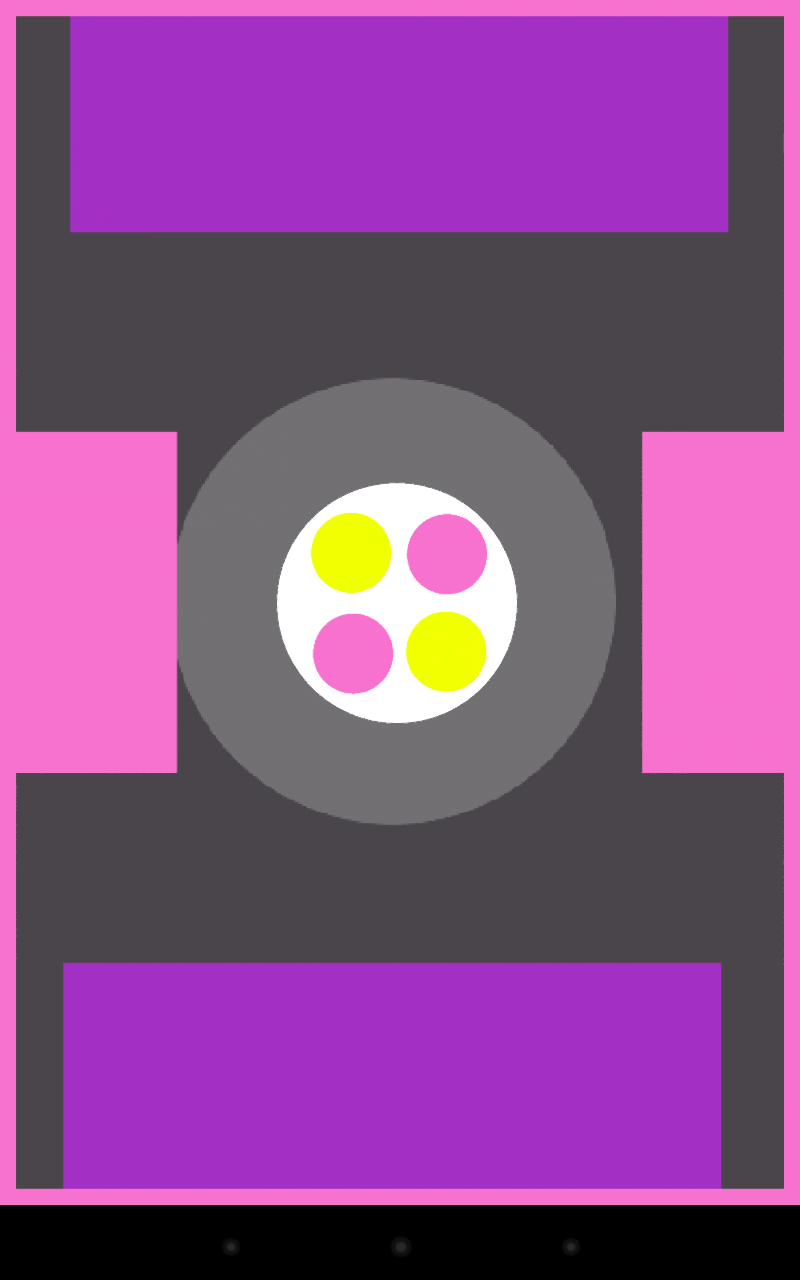
Unlike Dots, Color Zen is a puzzle game. The goal of each level is to fill the whole screen with whatever color is around the border. The first level looks like this:


It's pretty hard to fail; you just move the triangle up to the circle and when they touch they both expand to fill the screen. Great success! Next level.


Still simple. When you move the pink square to the pink circle, it fills the background with pink, but the blue shapes are still there. It works just like the fill tool in MS Paint.


Things get interesting when they add more colors and start nesting them within each other.


In Chapter 2 they introduce white objects, which can be used with any color. I also gather that later on I will encounter black objects, which remove anything they touch without expanding it.


I paid $1 for the "Classic" pack, which includes six chapters, each with 20 levels. There are two more packs that are available, each more challenging than the last. It is definitely a reasonable price.


Color Zen is available on Android and iOS.

Tuesday, August 27, 2013

Tomb Raider Review

Note: this blog has been migrated to Medium, with the articles here available to preserve permalinks Please see this post at https://medium.com/@ianrbuck/tomb-raider-review-513eefbca7d7

+Ian Decker played Tomb Raider and reviewed it on Eight Bit #30: Genuine Russian Mail-Order Bride and I have now finally finished the game. I've actually been playing it on and off for at least five months, what with working at camp and everything.


Tomb Raider is a single-player cinematic adventure game (there's a multiplayer portion as well but I ignored it). It is so cinematic, in fact, that about two hours into the game I turned to Ian and jokingly said "Well this has been a great 3D movie."

As a reboot of the Tomb Raider franchise, it follows a young Lara Croft who is fresh out of college and has never really been on an adventure where everything hits the fan. Obviously in this game it does.


Lara goes through a lot of hardships on her journey to becoming a badass, and a lot of it is pretty gruesome. The most gruesome are the many death animations for Lara, which become short scenes of their own.


The game is a third-person shooter with a lot of climbing and puzzle areas thrown into the mix. The climbing sections are very well put-together with lots of visual clues on where you need to climb next. Unfortunately there is almost always only one way to get to where you are going.

The combat is pretty challenging for a variety of reasons. The aiming isn't very tight, even with mouse and keyboard. It seems to me that this may have been an intentional decision by the designers to convey the fact that Lara is not an experienced shot through gameplay. Lara also does not run around with her weapons drawn all the time. She only pulls them out when you right-click to take aim. The game is not a proper stealth game, but I enjoyed trying to go for as long as possible without being detected and getting stealth kills with the bow.


As you progress through the game you acquire more gear to upgrade your weapons and tools with. That is the most tangible reward for exploration, but even if you don't explore at all there are still fixed points in the story where you will receive new gear. I was squealing like a little school girl when I got that compound bow.

Also optional are the tombs scattered just off the beaten path. Each tomb features an environmental puzzle and no enemies. The only reward that I noticed was some experience and the personal satisfaction from completing them. I think there might be an achievement in store if you finish all of them.


I felt that the story was well-developed and it was refreshing playing a game that wasn't afraid of killing off a few characters for the sake of Lara's growth as a character.


As far as graphics go, this was a gorgeous game. It was built with 3D in mind, and despite the fact that Crystal Dynamics partnered with AMD for things like Lara's "fancy hair" technology, Nvidia's drivers caught up by the time I started playing the game. I experienced very few performance issues, and I didn't find any other technical issues with the game.


I'm always happy when my favorite moment in the game is the ending. An even better sign is when I am shouting "YES! YESSS!!!" During the final battle.

I would definitely recommend this game to anyone with a system that can handle it. It took me 14 hours to get through the story, but I didn't explore quite as much as I could have. It costs $50 currently, but it shouldn't be too hard to find it on sale; I remember it being $12.50 during the Steam summer sale.

Check out the rest of my screenshots.

Monday, August 26, 2013

I Hate Adventures


Note: this blog has been migrated to Medium, with the articles here available to preserve permalinks Please see this post at https://medium.com/@ianrbuck/i-hate-adventures-c92d9c7342f7

Moving back to college is always exciting, but even I wasn't prepared for the amount of excitement yesterday brought me. The initial plan was to take two cars and spend the evening showing Morris to +Eric Buck+Amy Buck, and +Ian Decker. Then Ian found out that his family had bought tickets to the Science Museum, so he was out of the picture. We also managed to fit all of my worldly possessions into my tiny 1996 Ford Escort, so mom and dad didn't have to spend their entire afternoon and evening helping me move in.


They understandably warned me to drive carefully because I couldn't see out of my rear window, but I was pretty confident that I would be fine.

Everything went well for over an hour. I was having a great time jamming out to Portable Sounds and was passing through the St Cloud area when my car started vibrating and making this weird sound. It sounded kind of like a flat tire, so I pulled over and checked my tires. None of them were flat, so I got back in and kept going, but a little slower than before. The vibrating kept going, so I stuck my head out the window to see if I could see anything wrong. Of course, my hat flew right off of my head.

Well great, that just ruined my day, I thought to myself. Then I looked in the side mirror and saw that the hat hat hooked itself on the handlebar of my bike. Crisis averted. Just then my tire shredded itself.


Luckily it didn't blow itself out, and I was able to pull over without panicking too much. Changing the tire involved taking a whole lot of stuff out of the trunk and watching the semi trucks very carefully as they came hurtling at me at 75 miles per hour.

I have never done anything so terrifying in my life.

I got everything packed up again and took the next exit to try to find a mechanic open on a Sunday. Hint: mechanics are not open on Sundays.

So I ended up driving the remaining two hours to Morris on a spare tire. I was amazed that it handled fine at 60 miles per hour, because the impression that I had gotten was that driving over 45 on a spare is dangerous.

I got to Morris 3 and a half hours later than I had planned, but in one piece.

Wednesday, August 21, 2013

Dots Review

Note: this blog has been migrated to Medium, with the articles here available to preserve permalinks Please see this post at https://medium.com/@ianrbuck/dots-review-1413d63f58b3

I first heard about Dots: A Game About Connecting through +Ryan Rampersad. Since he called me a "pro-gamer" I had to check it out.


After a quick 30-second tutorial you can jump straight into the game. You are greeted with a nice minimalist grid of colored dots.


As the title of the game suggests, you get points by connecting dots of like colors. Those dots will then disappear and all of the dots above them will move down to replace them.

Like so.
If you create a square (of any size) you will clear all of the dots of that color. Strategically clearing dots to create squares is an excellent strategy.

Being that this is a free-to-play game, there obviously has to be some sort of in-app purchase to support it. Those would be the special abilities you see at the bottom. They can stop the clock, eliminate one dot, or eliminate all of the dots of a particular color. They are purchased with dots, which you can get by playing games or by paying a bit of money. If you are worried about it being pay-to-win, you can relax; you can only freeze the clock and eliminate all dots of one color once per game, and the abilities are cheap enough that I have always had a few of each available.

There are two modes: timed mode and moves mode. In timed you have 60 seconds to connect as many dots as possible. It's pretty frantic. In moves mode you get 30 moves. I prefer moves mode because I can plan out my moves and get the best score possible.


Since this game is all about getting high scores, you can connect it to your Facebook and Twitter accounts to compare scores with your friends. It is also easy to share a link to a page with your high score on whatever medium you prefer.

The game's simplicity is both a strength and a weakness. I had a good time with it, but I have quickly become bored with it. I'll probably revisit every once in awhile to see if I can beat my high scores, but it hasn't sucked me in the way Super Hexagon did.

Dots is available on Android and iOS.

Thursday, August 15, 2013

Super Hexagon Review

Note: this blog has been migrated to Medium, with the articles here available to preserve permalinks Please see this post at https://medium.com/@ianrbuck/super-hexagon-review-ff5eb1050b55

I reviewed Super Hexagon way back in Eight Bit #24: I Only Lasted Fifty Seconds! and I have completely neglected to make a written version until now.


This game is very well suited to mobile platforms. It is simple, easy to pick up quickly, each game doesn't last long, and it is very addicting. The soundtrack is also a very catchy trio of chiptune songs by Chipzel.


The point of the game is to maneuver a little triangle to avoid hitting the brightly-colored lines that are making their way towards the middle of the screen. The control scheme consists of tapping the right side of the screen to rotate clockwise and the left side of the screen to rotate counterclockwise. That's it, there isn't anything else to it.

Of course, avoiding the lines is easier said than done. The game is so aware of its incredible difficulty that the first stage is labeled as "hard". Initially it seemed impossibly fast and I usually lost after only a few seconds. But over time I started to see patterns and I got better at picking my fingers up quickly, and my high score slowly began climbing.

If you do not like this kind of challenge, this game is not for you.


Every ten seconds a female voice calls out a new polygon. Point, Line, Triangle, Square, Pentagon, and finally Hexagon. I have never been happier to hear the names of geometrical shapes.

Initially there are three stages available: Hexagon, Hexagoner, and Hexagonest. They get progressively faster and feature different patterns for you to master. Once you make it to sixty seconds in one of them, a faster version of that stage unlocks (for a total of six stages). Currently I have completed the first two stages and I am working on the third.


The best thing about the game is that it is entirely skill, reflex, and speed based. So when you improve on your high score you know that it is entirely because you have improved your skill at the game, not because you unlocked some arbitrary ability that helped you last longer.


I would definitely recommend getting Super Hexagon on your mobile platform of choice. It costs $3 and is available on AndroidiOS, and Blackberry and on Windows, Mac, and Linux through Steam or superhexagon.com.

One last thing: don't try to play this game while spinning in an office chair. You will probably throw up.

Friday, August 9, 2013

Dream: My Body is Made of Stone


Note: this blog has been migrated to Medium, with the articles here available to preserve permalinks Please see this post at https://medium.com/@ianrbuck/dream-my-body-is-made-of-stone-521ed8943a0c

Last night I had a fever. It wasn't an extremely bad fever, but I had a feeling that it was going to give me interesting waking dreams.

It first started with the sensation that I was falling backwards into my pillow. Then my body started feeling really heavy. I could feel my weight pressing down on the mattress more than usual. Then I realized that I couldn't move my arms or legs and my fingers felt fat and a little tingly. It actually felt a little familiar because I sometimes had the falling sensation and fat fingers while falling asleep as a child.

I sleep in a cabin with four other guys here at camp, and I wanted to alert them to the fact that my body was made of stone. That was when I realized that I couldn't talk either. I panicked a little and tried even harder to move, but of course the more I tried the harder it was to move.

Frankly it was kind of terrifying.

A part of me realized that this was only happening because I actually wanted to lie still. Eventually I made the conscious decision to stop panicking and trying to move. Eventually I fell asleep and the next time I woke up I could move again.

Wednesday, August 7, 2013

Podcasts at the Speed of Thought


Note: this blog has been migrated to Medium, with the articles here available to preserve permalinks Please see this post at https://medium.com/@ianrbuck/podcasts-at-the-speed-of-thought-1be9fc21cbc

Ever since I started my podcast I've been listening to more and more podcasts. Being that most of them are weekly and each episode is an hour to two hours long, it's a big time commitment.

Luckily BeyondPod recently came out with an update that now supports multiple playback speeds. I didn't think much of it until I tried it out and realized just how much of a time saver it is. And the best thing is that even though I couldn't comprehend what people were saying at 2x speed at first, I am slowly making my way up. I started at 1.3x and am now up to 1.45x.

Of course speeding up a podcast works better for some shows. I have found that At the Nexus and Control Structure are quite easy to understand (and I bet my show would be too) because we're not professional podcasters and we don't talk very fast. Same goes for the PC Gamer Podcast. The Besties talk a bit faster, and The Nerdist is extremely fast (although it does depend on the guest.) I was also recently introduced to Welcome to Night Vale and I haven't decided if I want to listen to it at increased speed because a huge part of the humor of that show depends on his monotone delivery and timing.

The weirdest part of listening at 1.4x speed is the theme song that typically happens at the beginning of a podcast. In the case of Control Structure, where they have a musical transition between sections of the show and occassionaly music playing under their voices, it gets even weirder.

Overall I really like the ability to speed up podcasts because it is a more efficient use of my time and it makes me feel more like a pro.

Sunday, July 28, 2013

Dream: Nathan Fillion at the Beach


Note: this blog has been migrated to Medium, with the articles here available to preserve permalinks Please see this post at https://medium.com/@ianrbuck/dream-nathan-fillion-at-the-beach-adc4d3337228

There were a couple of things that pretty clearly influenced this dream: last week I volunteered as a photographer for STORM Camp (check out the photos I took) and right before going to bed I was listening to an episode of the Nerdist Podcast with Joss Whedon.

I was at a work site for STORM taking pictures, when I saw a football with pictures of Nathan Fillion at a beach printed on it. I found out that he was still at that beach, and lo and behold I was suddenly at the beach. I found Nathan Fillion but I was too nervous to go up and say hi. So I took the totally-not-creepy route and started trying to get good shots of him. I got distracted for a moment and when I looked back he was gone, no sign of where he went.

Suddenly a shark jumped out of the ocean onto the beach, and I got a really good shot of that. However it turned out to be not a shark, but a person in a shark suit. Apparently I had been standing in a hallway that was connected to the beach because I looked around and saw +Matthew Linder mopping the floor. I found an HTC phone on the ground that he had mopped over, and somehow it still worked despite being completely soaked. I think Matt and I talked about electronics for a while after that.

Overall this dream doesn't seem to mean anything and there really isn't anything holding the various parts together. But seriously, Nathan Fillion.

Sunday, July 7, 2013

Guide for New Android Users

Note: this guide is horribly out of date at this point, so take everything with a grain of salt. I am leaving this article here as it is for posterity.

My best friend +Ian Decker recently got the HTC Thunderbolt, and it is his first Android phone ever. So I figured I should be a good friend and influence the way he uses his phone. Note: most of the links in this article go to the Google Play site for that app, where you can conveniently click "install" and that app will install on the device you selected. No need to even touch the device.

Step 1: Picking your device
Android devices run the whole spectrum of price, size, and even shape. Everyone has their preferences, but the one thing that I can say to everyone is this: make sure that the device you are buying runs Android 4.0 or higher. There are a lot of apps that aren't available on older versions, and 4.0 is the cutoff for a lot of them. I also prefer stock Android to pretty much any skin, so I would recommend a Nexus or the Google Play edition of one of the third-party phones.
+Marques Brownlee has a great YouTube channel where he does reviews of tons of phones, so check him out.

Ian's reasoning behind getting the Tunderbolt was that it is the cheapest phone running Ice Cream Sandwich on the Verizon network. And being that it was the first Verizon phone with 4G/LTE I'm sure it is a quality phone, if a bit dated.

Step 2: Apps
It's important to find quality apps for all of the things you will be doing with your device. Google makes really good first-party apps, but sometimes there are third-party alternatives that are better.

Google
Most of Google's apps come pre-installed, but if they aren't you'll have to go grab them.
Chrome: I know that there are a lot of browsers on Android, and some of them run more smoothly than Chrome; however, I've stuck with it because it syncs with the desktop version of Chrome.
Gmail: by far the best email app out there.
Maps: this ain't no Apple Maps. It's never steered me wrong, and Google's collection of Street View images is unbeatable.
Search: the Google Search app is so much more than just search. Google Now strives to give you the information you need at any given time, before you have to ask for it. The weather is always there for your location, and things like your next appointment, upcoming flights, tracking packages that are being shipped to you, updates on sports, nearby events, and time to get home are displayed when appropriate. It is the most useful feature of having a device that is always with you.
Calendar: how else will you keep track of your life?
Google Drive: it is surprising how many different types of documents you can edit with the Drive app.
Keyboard: Google's stock keyboard for Android 4.0+ just blew the competition away with gesture typing and voice dictation all in one keyboard, and now even people with non-stock devices can use this wonderful app.
Goggles: this is a pretty cool app that will search by taking a picture. If you see a painting or landmark that you don't recognize, try taking a picture of it with Goggles. It also recognizes QR codes.
My Tracks: I used this app to record some hiking trips we went on during our trip to Yellowstone.
Cloud Print: Google originally came up with this when they invented ChromeOS. If you need to print something but you're using a device that isn't connected to a printer, send it to cloud print and your computer at home will print it for you.
Keep: great for quickly jotting things down for later. It can also store pictures and voice recordings as notes.

Media Consumption
Google Music: definitely the easiest way to get your library onto your Android device. Install the Music Manager onto your computer and upload your music files to Google. You can then play them from any computer or Android device. Their new All Access program is a great deal: everything in their store for $10 a month. I don't think that I will ever buy music again.
Google BooksKindle, Nook: no matter who you buy books from, there's a way to read them on Android.
BeyondPod: I know you are all faithful listeners of my podcast and many other podcasts. BeyondPod is my favorite podcast manager for Android.
YouTube: duh.
Feedly: this is definitely the best alternative to the late Google Reader (may it rest in peace.) If you don't use an RSS reader, you should really start. It's incredibly useful for keeping up with comics, blogs, and news sites that have new content on a regular basis.

Communication
Hangouts: Google's integration of their chat services is complete, and Hangouts is the result.
Google Voice: even if you don't have a phone, you can still have a phone number! Google Voice allows you to text and make calls over wifi, and it synchronizes with the desktop version.
Skype: not as good as Hangouts, but maybe you have friends who are only on Skype.

Social
Google+: my favorite social network.
Facebook: not the best designed app, but it sure beats using their mobile site.
I'm sure that whatever social network you enjoy using has an app. I know for a fact that there a bajillion Twitter apps.

Games
I haven't been gaming a ton on my Nexus 7, but here are a few suggestions.
Superbrothers Sword & Sworcery: if you like story-based games, music, and/or tongue-in-cheek humor, you will love this game. I know I did.
Super Hexagon: This is a really fast-paced reflex game where you just try to last as long as possible without getting hit by the edges coming towards the middle of the screen.
Beat Hazard: an Asteroid-like twin stick shooter where the pace of the enemies and the strength of your weapons is determined by the music you are playing. It's a blast.
Keep an eye on the Humble Bundle. They occasionally have Android games.
There are emulators available on Android, but I haven't checked any of them out. I believe that the legal stance on emulators is that if you own the game itself, it is legal to have a ROM of that game.

Miscellaneous
DashClock: I like this widget because it displays a lot of important information at once. The time, unread email, upcoming events on my calendar, etc.
ES File Explorer: one of the things that Android lacks is a proper file explorer. This is usually fine, but power users will definitely want to install this one.
Steam: PC gamers will want to get this app so they can access the Steam chat, store, and community pages.
Wifi Analyzer: I don't know what half the things are that it tells you, but there it is.
Voice Recorder: a nice simple audio recorder.
Zombies, Run!: this is the best motivation for running that I have found. It narrates a story for you while you run, and anytime there are zombies nearby you have to run faster.
MTG Counter: if you play Magic the Gathering you've probably gotten tired of having to keep track of how much life you have left. This app does that and has a dice roller.
Adblock Plus: I've never met anyone who has said that they like seeing advertisements on websites. It will also sometimes prevent ads from popping up in other apps, which is probably why they aren't in the Play Store anymore.


Step 3: Customization
Now it is time to make your device your own. Organize your apps. Change your wallpaper. Put some widgets on your homepage. Change your ringtone. Android is endlessly customizable. This is really a matter of personal preference.

Step 4: Enjoy!
Go to town and start using your new Android device. And let me know if you find new stuff that I don't know about.